ZWCAD Year-End Promotion 2025

Enjoy up to 15% off new purchases or Yearly Maintenance

Campaign period: 25 November – 25 December 2025

Our offers for you

Terms and conditions

Campaign period: 25 November – 25 December 2025.

Availability: Europe-only promotion. Please contact your local reseller or distributor for participation details.

Eligibility: Open to all customers. Applies to new purchases and Yearly Maintenance agreements only and cannot be combined with other promotions.

Discount scope: 15% off ZWCAD Standard, Professional, and MFG perpetual licences, 1-Year licences, and Yearly Maintenance. Upgrades are excluded from this campaign.

Redemption: Submit orders within the campaign window and reference the “ZWCAD Year-End promotion” to secure the discount.

Participating countries: Austria, Belgium, France, Germany, Netherlands, Switzerland, Denmark, Finland, Latvia, Lithuania, Estonia, Norway, Sweden, United Kingdom, Albania, Bosnia and Herzegovina, Croatia, Greece, Cyprus, Italy, Malta, Montenegro, North Macedonia, Portugal, Serbia, Slovenia, Spain, Bulgaria, Czech Republic, Slovakia, Hungary, Poland, Romania, Turkey and CIS region

ZWCAD 2026 – More Powerful, More Efficient
Building on ZWCAD 2025, the new ZWCAD 2026 takes performance, stability, and functionality to the next level. With enhanced reliability and exciting new features, it's designed to help you work smarter and faster than ever before.
Discover the key highlights below and see what's new in ZWCAD 2026!
Seamless compatibility with industry-standard file formats
The familiar user interface and commands enable users of mainstream CAD solutions to start creating instantly, with all essential commands and configurations readily available.
Seamless compatibility with industry-standard file formats
The familiar user interface and commands enable users of mainstream CAD solutions to start creating instantly, with all essential commands and configurations readily available.
A familiar interface designed for consistent user experiences
The familiar user interface and commands enable users of mainstream CAD solutions to start creating instantly, with all essential commands and configurations readily available.
A familiar interface designed for consistent user experiences
The familiar user interface and commands enable users of mainstream CAD solutions to start creating instantly, with all essential commands and configurations readily available.
A familiar interface designed for consistent user experiences
The familiar user interface and commands enable users of mainstream CAD solutions to start creating instantly, with all essential commands and configurations readily available.
A familiar interface designed for consistent user experiences
The familiar user interface and commands enable users of mainstream CAD solutions to start creating instantly, with all essential commands and configurations readily available.
Seamless compatibility with industry-standard file formats
The familiar user interface and commands enable users of mainstream CAD solutions to start creating instantly, with all essential commands and configurations readily available.
Seamless compatibility with industry-standard file formats
The familiar user interface and commands enable users of mainstream CAD solutions to start creating instantly, with all essential commands and configurations readily available.

ZWCAD 2026 - our best CAD solution - now even more powerful

ZWCAD 2026 elevates your design with innovative features that simplify your workflow, enhance productivity, and provide the precision and flexibility to bring your ideas to life.

Top Features

Enhanced V1.2
Efficiency Improvement
Open, pan and zoom complex 3D models faster and smoother.
NewV1.2
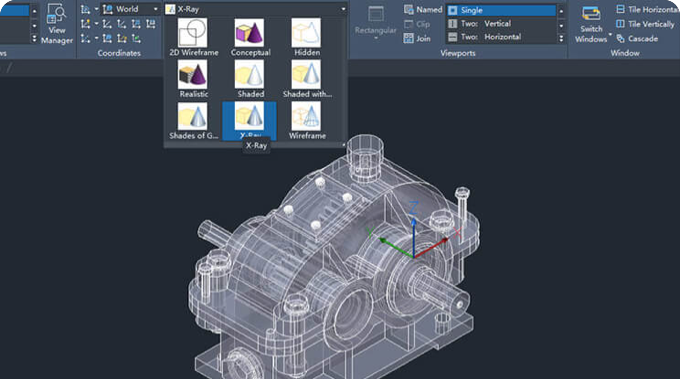
New Visual Styles
Meet diverse visualization needs with the addition of 4 visualstyles, including Conceptual, Realistic, Shade of Grey, and Xray.
NewV1.2
STEP File Import
Directly import 3D files in STEP formats (AP203 and AP214) without the hassle of format conversion.
New
3D Gizmo
Move, rotate, and scale 3D objects conveniently with 3D gizmos.
Enhanced
Ribbon Improvement
Customize your own workspace freely with Ribbon panels that can be slid out, dragged, floated and collapsed as icons.
Enhanced
Panel Improvement
Panels can be stacked and hidden automatically to provide a bigger drawing space. A new navigator helps you drag or dock panels more conveniently.
New
Floating Drawing Window
View multiple drawings simultaneously with drawing windows that can be dragged out of the program as floating windows.
Enhanced
Point Cloud Improvement
Meet different needs with the addition of 3 visual styles including Intensity, Elevation, and Classification, and the Navigate to Scan View function.
Enhanced
GIS Improvement
It can import more mapping services such as Bing Maps, and match geographic markers with specified points in drawings.
Show More Less

Get ZWVectorization for free if you pre-order ZWCAD 2026 today
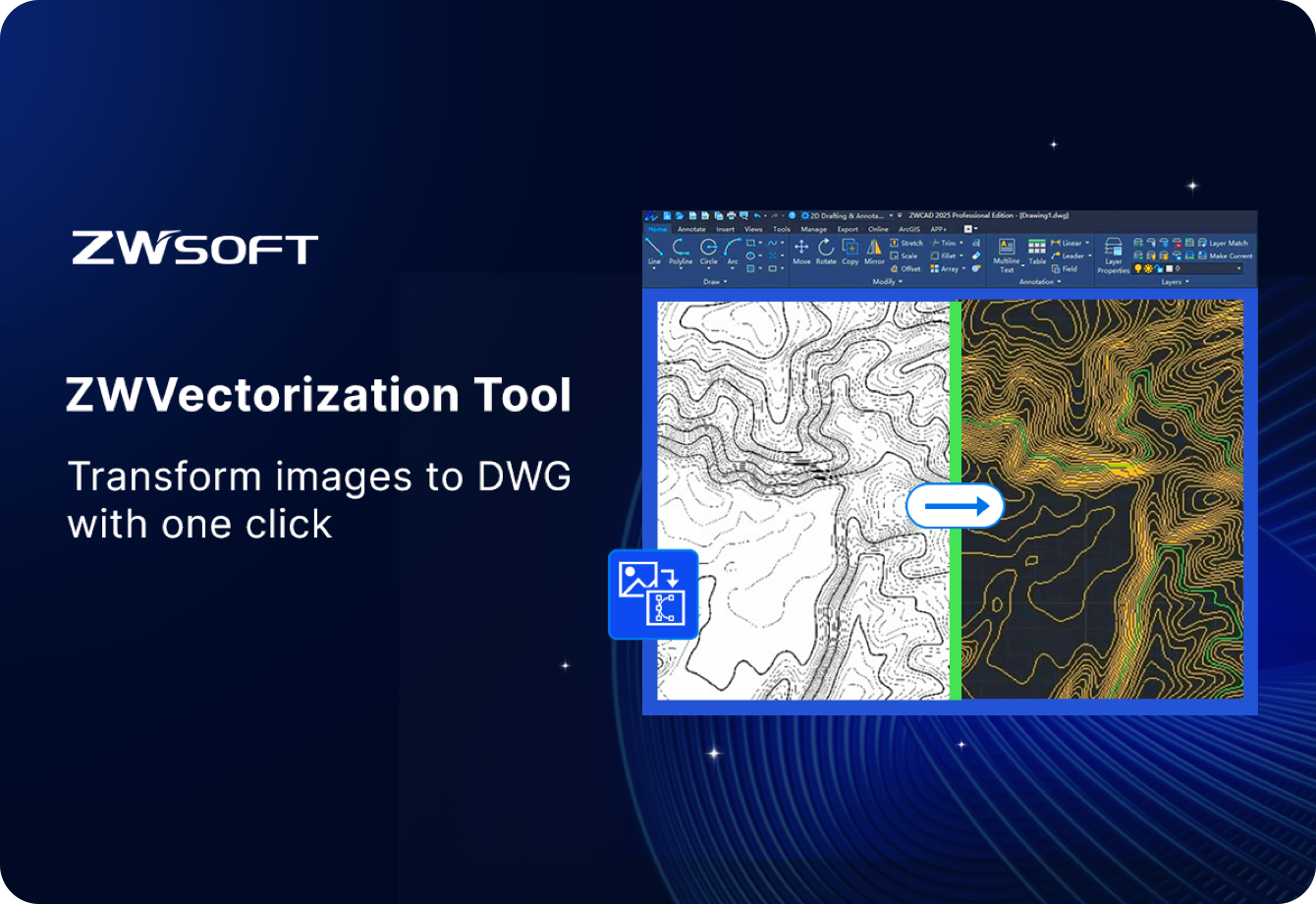
ZWVectorization Tool is an easy-to-use plugin that converts raster images to DWG drawings quickly and accurately. With this tool, you can easily convert scanned or hand-drawn legacy drawings into editable, high-quality DWG drawings, saving you significant time and money spent on manual redrawing.
Get ZWVectorization for free for one year if you pre-order ZWCAD 2026 Professional including Yearly Maintanence
Order ZWCAD 2026 Now

They Choose ZWCAD

Join over 1.4 million professionals worldwide who use ZWCAD to design tomorrow, today. Discover their experiences, read their success stories, and hear why they trust ZWCAD for their most innovative projects.

Top 5 critical FAQs · Week 1

Answers that drive 60% of qualified leads

Fast, trust-building responses for the questions people search most. The first five items below alone cover 40%+ of visitor intent; the rest tackle pricing, licensing, performance, and migration detail.

Yes—peer-grade, not a budget knock-off. Enterprise teams use it daily with 100% DWG compatibility, faster performance, and ~70% cost savings versus legacy CAD.

ZWCAD perpetual: £599–1,299 per seat (Standard/Professional), MFG £1,299–1,799. Flex subscription: £26.9/month. AutoCAD subscription: ~£310/month. Typical savings: 70%+ over three years.

Yes—99.9% compatibility across DWG 2000–2025 including blocks, layers, line styles, linetypes, and dimensions. LISP routines usually run with minor tweaks; UI is familiar to reduce ramp-up.

Yes—real-world client benchmarks show up to 1.98× faster overall. Large files (100MB+): 40–60% faster; typical 10–50MB files: 10–25% faster; overall workflows: 20–30% faster completion.

Yes. Perpetual is available and encouraged—you own it forever. Optional yearly maintenance (£150–200) keeps you current; Flex subscription is available if you prefer OpEx.

  • Standard (£599–799): 2D drafting.
  • Professional (£899–1,299, recommended): 2D + 3D, full API (LISP/VBA/.NET/ZRX).
  • MFG (£1,299–1,799): Pro + manufacturing tools, design tables, parametric blocks.
  • Flex (£26.9/month): Subscription option, always latest version.

Yes. After activation, ZWCAD runs 100% offline indefinitely—no always-on internet or phone-home requirements.

ZWCAD perpetual: £899–1,299 initial + optional £0–200/year = £899–1,699 per seat over 3 years. AutoCAD subscription: £310/month × 36 = £11,160. Savings: £5,800–9,100 per person (10 seats ≈ £58k–101k saved).

Yes: 5–15% for 10+ seats, flexible payment terms, educational licenses, and loyalty pricing for renewals.

Yes. Perpetual is available (own it forever) and Flex subscription is optional. No forced upgrades or lock-in; maintenance is optional but recommended to stay current.

  • Standard maintenance (£150–200/year): bug fixes, patches, email/portal support, knowledge base.
  • Cygnas premium: local UK engineers, 2–4 hour escalation, tailored training, migration help, design review/optimisation.

Yes—Professional and MFG include geometric constraints (horizontal, vertical, tangent, coincident), dimensional constraints, block parametrics, and associative dimensions.

Yes—about 95% run unchanged. VBA macros are fully supported; .NET plugins are supported via SDK. Cygnas can adjust or modernise scripts for you.

Yes—Professional covers 2D drafting, paper space, viewports, plot styles, GIS integration, and handles very large building plans (1GB+) while staying 70% cheaper than AutoCAD.

Yes—ZWCAD MFG adds GD&T, thread specs, fastener libraries, BOM, smart blocks, and mechanical toolsets suited to production and assembly drawings.

Yes—tested on 1GB+ files with reliable stability. Performance gains: 40–60% faster on huge files, 10–25% faster on normal files, fewer crashes, efficient RAM use.

Yes—remote deployment is standard; on-site and hybrid rollouts are available (fees apply).

Yes—Cygnas converts AutoCAD LISP, builds new utilities, integrates third-party tools, and automates repetitive tasks. Typical pricing: £150–300/hour.

  • Local UK engineer support and faster response.
  • Training tailored to your workflows.
  • Full migration + integration (API, LISP).
  • Pricing flexibility and long-term partnership.

We’re consultants first, resellers second: chartered engineers with 25+ years in energy/oil & gas, track record with BP, Shell, Aramco, DNV, plus migration, training, and design optimisation baked in.

Nothing breaks—you keep using the software forever and your files remain accessible. You simply stop receiving new versions and maintenance updates.

  • CAD: DWG/DXF/DWT (2000–2025).
  • Point clouds: .las, .laz, .e57, .xyz.
  • Raster: .jpg, .png, .tiff, .pdf.
  • GIS: Shapefiles.
  • Data: Excel/CSV links to blocks.
  • 3D: STEP/IGES limited; best handled in ZW3D.

Get started with ZWCAD 2026 now

Start sparking creativity and boosting efficiency right away.